


I approached Segway Mobility as more than a companion app for getting a scooter or other Ninebot product moving. In the Travel & Local category, its real job is to sit between the rider and the vehicle: helping with setup, access to useful information, and the everyday decisions that are easy to overlook when you are in a hurry. That makes trust important. An app connected to personal transport can influence how confidently I ride, how quickly I find a problem, and how comfortable I feel about the account and device information involved.
This is the app formerly known as Segway-Ninebot, developed by Ninebot(Beijing) Tech Co., Ltd. It is free, rated for Everyone, and has passed the one-million-install mark. Its average score is 3.7 from roughly twelve thousand ratings, with hundreds of written reviews, so the overall picture is practical rather than universally enthusiastic. I read that rating as a sign that the app is useful for many owners but can also create friction depending on the device, phone, and setup situation.
How Segway Mobility earns confidence during everyday use
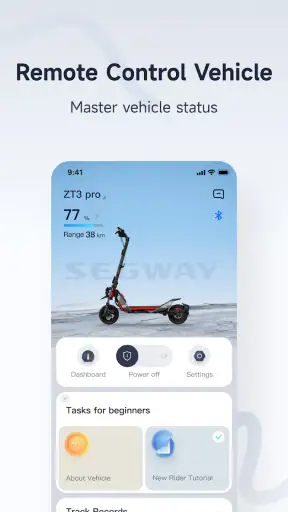
The first thing I value is that the app gives the vehicle a more understandable place in my routine. Instead of treating a scooter as a sealed object that I simply switch on, I can use the companion experience to organize the ownership side of it. That matters when I am preparing for a commute, checking something before leaving, or trying to understand whether an issue belongs to the vehicle or to the phone connection.
I would not describe it as a replacement for every travel app. It is not the tool I would choose to plan a complete journey, compare public transport, or find the best walking route. Its strength is narrower and more useful: it supports the Segway and Ninebot ecosystem. If you already own compatible hardware, that focus makes sense. If you are only looking for a general local travel application, installing it would not give you much value.
The developer is visible rather than hidden behind an unrelated publisher name, which helps establish the basic context. The app has been available since January 20, 2020, and the current release is version 6.10.9. Those details do not guarantee a perfect experience, but they show that this is an established product rather than a temporary utility made for a single launch.
My main trust test with an app like this is simple: does it help me understand what is happening, or does it make the vehicle feel dependent on unexplained screens and prompts? Segway Mobility is most convincing when it turns ownership tasks into clear steps. It is less convincing when the user has to guess whether a problem comes from Bluetooth, the account, the vehicle, or the app itself.
What I would check before relying on it
I would install it before the day I actually need the vehicle. That gives me time to sign in, pair the product, and examine the available settings without standing outside with a low battery and a schedule to keep. This is a small but important workflow improvement: setup is much less stressful when it is treated as preparation instead of an emergency repair.
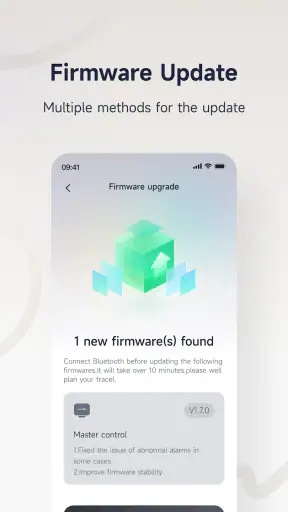
I would also keep the phone operating system and the app current, while avoiding an update immediately before a long trip. The minimum supported system is Android 8.0, which makes the compatibility range fairly approachable for many Android users. Still, compatibility on paper is not the same as a smooth connection on every handset, so I would test the exact phone I intend to carry.
Another useful habit is to separate app problems from vehicle problems. If the app does not connect, I would first check whether the phone has Bluetooth enabled, whether another phone is already connected, and whether moving closer to the vehicle changes anything. I would then restart the app before assuming that the scooter itself is faulty. This order avoids unnecessary resets and makes support conversations more precise.
Account choices deserve attention
Because the app acts as a vehicle companion, I would pay attention to every sign-in screen, device-pairing prompt, and account control it presents. I would use an email address I can reliably access, choose a password I do not reuse elsewhere, and avoid borrowing someone else’s account simply to complete setup. That keeps ownership and troubleshooting clearer, especially in a household where more than one person may use the same vehicle.
I would also review the app’s visible settings rather than accepting every prompt automatically. The important principle is not to assume that a permission is harmless just because the app is familiar. I want to know what the phone is being asked to provide, why that access is relevant to the task in front of me, and whether I can continue with a narrower choice.
This is where the experience can feel less straightforward than using a paper manual or a basic dashboard. A physical control gives immediate feedback without an account screen. Segway Mobility can provide a richer ownership layer, but that also means more attention from the user. My advice is to treat the first launch as a privacy and access check, not merely as a button to press until the vehicle responds.
Moments when data sensitivity matters most
The most sensitive moments are not necessarily dramatic. They are the ordinary points where the app may connect a person, a phone, and a vehicle: creating or entering an account, pairing hardware, allowing phone access, and using any location-related choice that appears during operation. I would slow down at those moments and read the wording on screen rather than granting access out of habit.
I cannot recommend a single permission setup for every owner because the useful choices depend on the device and the phone environment. Instead, I would use a task-based approach. If a permission is needed for pairing, I would grant it while pairing and then revisit the phone’s settings afterward. If a feature appears to work without continuous access, I would prefer the narrower option. This gives me more control without pretending that every permission has the same purpose.
Location is especially worth handling carefully on a mobility app. I would ask myself whether I need a location-dependent function at that moment, whether the phone offers one-time or limited access, and whether the app still performs its basic companion role without broader access. The safest practical choice is the one that supports the feature I actually intend to use, not the one that grants the widest access by default.
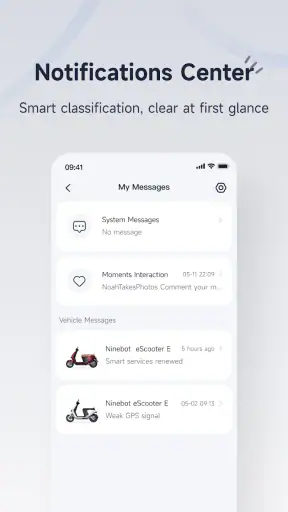
I would use the same caution with notifications. Helpful alerts can make a vehicle easier to monitor, but unnecessary notifications quickly become noise. I prefer to keep only the alerts that support a real decision, such as something I need to check before riding, and silence the rest. This is not just about privacy; it also makes important messages easier to notice.
Useful workflows that are easy to overlook
One of my preferred workflows is a pre-ride check performed at home. I open the app, confirm that the vehicle is recognized, look for anything unusual, and close the app before leaving. Doing this in a calm environment gives me a chance to resolve account or connection issues while I still have time. It also prevents the common mistake of trying to troubleshoot beside a busy road.
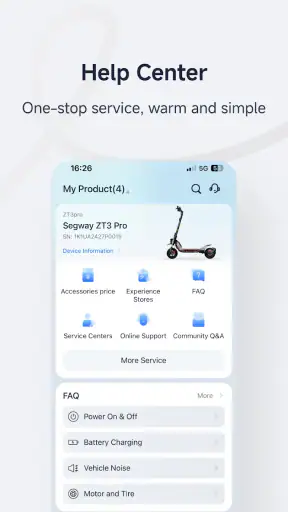
A second workflow is to use the app as a record of questions rather than as the only source of answers. If a warning appears, I note exactly when it happened, what the vehicle was doing, and whether reconnecting changed the behavior. That information is more useful than saying only that “the app failed.” It helps me decide whether to retry, inspect the hardware, or contact the developer’s support channel.
A third is household handover. If another person uses the vehicle, I would agree on who owns the account, who changes settings, and how the device is disconnected from a phone after use. This avoids a surprisingly common kind of confusion: two people each believing the other person’s phone is the active one. Clear ownership is a user-control feature even when it is handled through a simple household rule.
I also would not use the app as a reason to ignore physical checks. A digital screen may help organize information, but it cannot replace looking at the tires, brakes, lights, folding mechanism, or visible damage before riding. The app is an ownership aid, not a substitute for basic responsibility. That distinction is important for anyone who expects software to certify that a vehicle is safe in every situation.
Where it fits against the usual alternatives
Compared with a generic navigation app, Segway Mobility is better suited to the vehicle itself and much less useful for planning a complete trip. I would use a navigation tool for streets, destinations, and route choices, then use this app for the Segway or Ninebot side of the experience. Trying to make one replace the other would leave gaps.
Compared with relying only on the vehicle’s built-in controls, this app can make ownership more organized, especially during setup and troubleshooting. The trade-off is dependence on a phone, a connection, and an account flow. A rider who wants the fewest digital steps may prefer using only the physical controls whenever possible. Someone who wants a clearer companion layer will likely appreciate the app more.
Compared with an unofficial utility, the official developer context is reassuring for compatibility and accountability. I would still avoid assuming that official means flawless. The 3.7 average suggests a mixed experience, and that is consistent with the kind of app that must work across different vehicles, phones, operating systems, and connection conditions. My choice would be the official app, but with realistic expectations about occasional setup friction.
Who should use it and who may want less
I think it is a sensible choice for owners who want one place to manage the digital side of a compatible Segway or Ninebot vehicle. It is also a good fit for first-time owners who would rather have guided setup and a clearer way to investigate problems than rely on memory or scattered instructions. The free price removes an obvious barrier, so trying it is reasonable when the hardware is part of the same ecosystem.
I would be more cautious about recommending it to someone who dislikes accounts, permissions, or phone-dependent controls. If your ideal ride begins and ends with a physical switch, this may feel like unnecessary administration. It may also disappoint people seeking a full travel planner, because its purpose is tied to mobility hardware rather than broad local discovery.
For families, the decision depends on how clearly access is managed. One shared account may be convenient, but it can blur responsibility. Separate personal use may be cleaner if the app and device support the required arrangement. I would make that decision before handing the vehicle to another rider, not after a connection conflict occurs.
For privacy-conscious users, I would not reject the app automatically. I would install it, read each visible request, choose the least extensive access that still supports the feature I need, and revisit the phone’s permission controls afterward. That approach respects user agency without making claims about practices that are not visible in the app experience.
My cautious verdict after using it as a companion
Segway Mobility is most valuable when I treat it as a focused ownership tool rather than a complete travel service. It can make setup, pairing, and everyday checks feel more manageable, and its official connection to Ninebot(Beijing) Tech Co., Ltd. gives it the right place in the ecosystem. The fact that it is free and available to a broad Android audience makes experimenting with it straightforward.
At the same time, I would keep expectations grounded. A 3.7 average and the volume of user feedback point to an app that works well enough for many people but is not frictionless for everyone. Phone compatibility, account access, permissions, and connection behavior can all affect the experience. The best way to reduce frustration is to set it up early, test it before a trip, and keep physical safety checks separate from what the screen reports.
My recommendation is cautious but positive: if you own compatible Segway or Ninebot hardware, install it and make deliberate choices during setup. Review the controls you are offered, grant only the access that matches your intended use, and keep an alternative way to handle basic riding tasks. If you want a general navigation app or a completely phone-free experience, choose a different tool. For the right owner, though, this app can turn an otherwise opaque vehicle into something easier to understand and manage.


